CI / REST API
GQLens exposes a REST API for managing GraphQL sources programmatically. Use it to register endpoints, trigger re-indexing, and poll status from CI pipelines, scripts, or any HTTP client.
Authentication
Every request must include an organization API key in the Authorization
header:
Authorization: Bearer gqlens_ak_...Only organization-scoped API keys are accepted. Personal (user-scoped)
keys will be rejected with 403.
Creating an API key
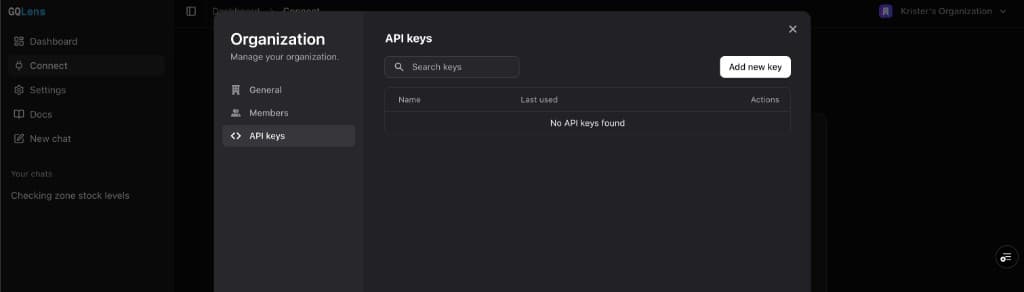
- Open GQLens and switch to the organization you want to manage.
- Click the organization switcher in the sidebar, then select Manage.
- Go to the API keys tab.
- Click Add new key, give it a name (e.g. “CI deploy”), and copy the secret.
- Store the secret as a CI variable (e.g.
GQLENS_API_KEY).
Base URL
https://api.gqlens.com/v1All endpoint paths below are relative to this base URL.
Endpoints
List sources
GET /v1/sourceReturns all sources belonging to the organization.
curl https://api.gqlens.com/v1/source \
  -H "Authorization: Bearer $GQLENS_API_KEY"
Response 200
{
  "sources": [
    {
      "_id": "jd7abc123def456",
      "name": "my-api",
      "endpointUrl": "https://api.example.com/graphql",
      "indexingStatus": "done",
      "schemaStats": { "types": 42, "queries": 12, "mutations": 8, "chunks": 156 }
    }
  ]
}
Create a source
POST /v1/sourceCreates a new source and automatically triggers indexing. The name must be unique within the organization.
| Field | Type | Required | Description |
|---|---|---|---|
name | string | yes | Unique source name within the org |
endpointUrl | string | yes | GraphQL endpoint URL |
description | string | no | Human-readable description |
curl -X POST https://api.gqlens.com/v1/source \
  -H "Authorization: Bearer $GQLENS_API_KEY" \
  -H "Content-Type: application/json" \
  -d '{
    "name": "my-api",
    "endpointUrl": "https://api.example.com/graphql",
    "description": "Production API"
  }'
Response 201
{
  "source": {
    "_id": "jd7abc123def456",
    "name": "my-api",
    "endpointUrl": "https://api.example.com/graphql",
    "description": "Production API"
  },
  "created": true
}
Get a source
GET /v1/source/:idReturns a single source by its Convex document ID with full details.
curl https://api.gqlens.com/v1/source/jd7abc123def456 \
  -H "Authorization: Bearer $GQLENS_API_KEY"
Response 200
{
  "source": {
    "_id": "jd7abc123def456",
    "name": "my-api",
    "endpointUrl": "https://api.example.com/graphql",
    "indexingStatus": "done",
    "indexingProgress": { "current": 156, "total": 156 },
    "schemaStats": { "types": 42, "queries": 12, "mutations": 8, "chunks": 156 }
  }
}
Update a source
PUT /v1/source/:idUpdates the source fields and triggers a re-index.
| Field | Type | Required | Description |
|---|---|---|---|
name | string | yes | Source name |
endpointUrl | string | yes | GraphQL endpoint URL |
description | string | no | Human-readable description |
curl -X PUT https://api.gqlens.com/v1/source/jd7abc123def456 \
  -H "Authorization: Bearer $GQLENS_API_KEY" \
  -H "Content-Type: application/json" \
  -d '{
    "name": "my-api",
    "endpointUrl": "https://api.example.com/graphql",
    "description": "Updated production API"
  }'
Response 200
{
  "source": {
    "_id": "jd7abc123def456",
    "name": "my-api",
    "endpointUrl": "https://api.example.com/graphql",
    "description": "Updated production API"
  }
}
Delete a source
DELETE /v1/source/:idRemoves a source and all its indexed data.
curl -X DELETE https://api.gqlens.com/v1/source/jd7abc123def456 \
  -H "Authorization: Bearer $GQLENS_API_KEY"
Response 200
{ "deleted": true }Trigger re-index
POST /v1/source/:id/reindexRe-fetches the GraphQL introspection schema, re-chunks, and re-embeds
for semantic search. Returns 202 Accepted once indexing has started.
Poll GET /v1/source/:id/status to track progress.
curl -X POST https://api.gqlens.com/v1/source/jd7abc123def456/reindex \
  -H "Authorization: Bearer $GQLENS_API_KEY"
Response 202
{
  "indexing": true,
  "source": {
    "_id": "jd7abc123def456",
    "name": "my-api",
    "indexingStatus": "embedding",
    "indexingProgress": { "current": 0, "total": 156 }
  }
}
Get indexing status
GET /v1/source/:id/statusLightweight polling endpoint that returns only indexing-related fields.
curl https://api.gqlens.com/v1/source/jd7abc123def456/status \
  -H "Authorization: Bearer $GQLENS_API_KEY"
Response 200
{
  "_id": "jd7abc123def456",
  "name": "my-api",
  "indexingStatus": "done",
  "indexingProgress": { "current": 156, "total": 156 },
  "indexingError": null
}
indexingStatus | Meaning |
|---|---|
preparing | Indexing pipeline initializing |
fetching | Fetching introspection from the endpoint |
storing | Storing schema data |
embedding | Generating embeddings for semantic search |
done | Indexing complete |
error | Indexing failed — check indexingError |
Error responses
All errors return a JSON object with an error field:
{ "error": "Source not found" }| Status | Meaning |
|---|---|
400 | Bad request (missing fields, invalid JSON) |
401 | Missing or invalid API key |
403 | Personal key used (org key required), or insufficient permissions |
404 | Source not found |
409 | Source name already exists |
500 | Internal server error |
CI workflow: deploy and re-index
The typical CI flow after deploying a new GraphQL schema:
- Trigger re-index with the source ID.
- Poll status until
indexingStatusisdoneorerror.
GitHub Actions example
name: Sync GQLens Source

on:
  push:
    branches: [main]
  workflow_dispatch:

env:
  GQLENS_API: https://api.gqlens.com/v1
  SOURCE_ID: jd7abc123def456  # Your Convex source ID

jobs:
  sync:
    runs-on: ubuntu-latest
    steps:
      - name: Trigger re-index
        run: |
          curl -sf -X POST \
            "$GQLENS_API/source/$SOURCE_ID/reindex" \
            -H "Authorization: Bearer ${{ secrets.GQLENS_API_KEY }}"

      - name: Wait for indexing
        run: |
          for i in $(seq 1 30); do
            STATUS=$(curl -sf \
              "$GQLENS_API/source/$SOURCE_ID/status" \
              -H "Authorization: Bearer ${{ secrets.GQLENS_API_KEY }}" \
              | jq -r '.indexingStatus')
            echo "Indexing status: $STATUS"
            if [ "$STATUS" = "done" ]; then
              echo "Indexing complete!"
              exit 0
            elif [ "$STATUS" = "error" ]; then
              echo "Indexing failed"
              exit 1
            fi
            sleep 5
          done
          echo "Timed out waiting for indexing"
          exit 1
Shell script
#!/usr/bin/env bash
set -euo pipefail

API_KEY="${GQLENS_API_KEY:?Set GQLENS_API_KEY}"
API="https://api.gqlens.com/v1"
SOURCE_ID="${1:?Usage: $0 <source-id>}"

# Trigger re-index
curl -sf -X POST "$API/source/$SOURCE_ID/reindex" \
  -H "Authorization: Bearer $API_KEY"

# Poll until done
while true; do
  STATUS=$(curl -sf "$API/source/$SOURCE_ID/status" \
    -H "Authorization: Bearer $API_KEY" \
    | jq -r '.indexingStatus')
  case "$STATUS" in
    done)  echo "Done"; break ;;
    error) echo "Failed"; exit 1 ;;
    *)     echo "Status: $STATUS"; sleep 5 ;;
  esac
done
Finding your source ID
Your source ID is the Convex document ID shown in the GQLens dashboard URL
when viewing a source (e.g. dashboard.gqlens.com/source/jd7abc123def456),
or returned by GET /v1/source in the _id field.